
Download Review.legal – Secure AI‑Powered Legal Review Tool for Web Apps
Overview
Review.legal is a cloud‑native, AI‑driven legal review platform that brings the power of natural‑language processing to contract analysis, privacy policies, terms of service, and other critical business documents. Launched in early 2025, the service is built to run entirely in a modern web browser, which means there is no heavyweight client to install and no operating‑system‑specific binaries to manage. Users simply navigate to the official website, create an account, and start uploading files. The underlying AI model has been trained on millions of legal clauses from multiple jurisdictions, allowing it to spot high‑risk language, missing statutory references, and jurisdiction‑specific compliance gaps in real time. All data is encrypted in transit with TLS 1.3 and at rest with AES‑256, and the platform complies with industry‑standard security frameworks such as ISO 27001 and GDPR. While a free tier offers a limited number of daily scans, the paid subscription unlocks batch processing, a customizable rule engine, API access, and advanced reporting capabilities. Review.legal targets legal departments, in‑house counsel, startups, and any organization that wants to reduce reliance on costly external lawyers while maintaining a high level of compliance. Its intuitive dashboard, instant feedback loop, and continuous regulatory updates make it a compelling choice for teams that need to move fast without sacrificing legal accuracy.
Key Features
- AI‑Driven Clause Detection: Automatically flags high‑risk provisions, missing mandatory language, and jurisdiction‑specific requirements.
- Real‑Time Editing Suggestions: Provides alternative wording and best‑practice recommendations as you edit.
- Batch Processing: Allows simultaneous analysis of multiple documents and generates a consolidated risk matrix.
- Custom Rule Engine: Enables creation of organization‑specific compliance rules without writing code.
- RESTful API & Integrations: Connects seamlessly with SharePoint, Google Drive, Dropbox, OneDrive, and custom workflows.
- Secure Cloud Storage: Files are encrypted with AES‑256 and protected by multi‑factor authentication.
- Version History & Audit Trail: Every change is logged, supporting internal audits and regulatory inquiries.
- Multi‑Language Support: Currently supports English, Spanish, French, and German with plans for additional languages.
- Continuous Regulatory Updates: The AI model is retrained weekly with the latest statutes, case law, and guidance.
- Collaboration Workspace: Teams can comment, suggest edits, and approve documents within a shared interface.
Each feature has been designed to streamline the end‑to‑end legal review workflow. The AI engine not only highlights potential issues but also explains the legal reasoning behind each recommendation, turning the tool into an on‑demand learning resource for junior staff. Batch processing is a game‑changer for enterprises that handle hundreds of vendor agreements or employee contracts each month; a single click produces a risk‑scored report that senior counsel can prioritize instantly. The custom rule engine empowers organizations to embed internal policies—such as ISO 27001 controls or HIPAA safeguards—directly into the analysis pipeline, ensuring that every document conforms to both external regulations and internal standards. With the RESTful API, developers can automate document ingestion from existing content management systems, retrieve JSON‑formatted analysis results, and feed them into custom dashboards or compliance portals. Together, these capabilities position Review.legal as an enterprise‑grade solution that blends powerful AI with practical usability.
Installation & Usage Instructions
Signing Up – The “Download” Process
Because Review.legal is a web‑based service, there is no traditional download. To get started, visit https://www.review.legal, click the “Start Free Trial” button, and complete the registration form with your name, business email, and a strong password. After confirming your email, you will be taken to the dashboard where you can immediately begin uploading documents. The free tier provides up to three scans per day, which is enough for a quick evaluation of the platform’s capabilities.
Uploading Documents and Running an Analysis
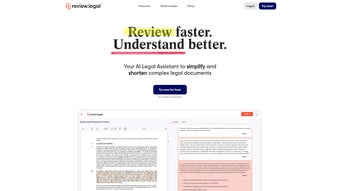
From the dashboard, click the prominent “Upload Document” button. Review.legal accepts PDF, DOCX, and plain‑text formats. After selecting a file, you may add optional tags (e.g., “Vendor Contract”, “Employee NDA”) to help categorize the output. The AI begins processing instantly; most standard contracts are analyzed in under ten seconds, while larger agreements (over 200 pages) may take a few minutes. Once complete, a detailed report appears on the right side of the screen, highlighting each clause, assigning a risk level (Low, Medium, High), and providing actionable suggestions with inline comments.
Customizing the Rule Engine
To tailor the analysis, navigate to the “Rule Builder” tab under Settings. Here you can create new rules by defining keyword patterns, mandatory language, or references to specific statutes. For example, you could add a rule that mandates a “Force Majeure” clause in all service agreements. Saved rules are applied automatically to every subsequent document, ensuring consistent compliance across the organization. The interface includes a preview mode that lets you test a rule against a sample document before activating it.
Integrations, API Access, and Automation
Review.legal’s “Integrations” page allows you to link your cloud storage accounts—Google Drive, OneDrive, Dropbox, or SharePoint—with a few clicks. Once connected, you can import documents directly from these services and push reviewed versions back, preserving version history. For developers, an API key can be generated from the “Developer” section. The RESTful API follows standard bearer‑token authentication and returns JSON payloads containing clause‑level risk scores, suggested edits, and audit metadata. This makes it easy to embed Review.legal’s analysis into existing contract management platforms or internal compliance dashboards.
Security Best Practices
Legal documents often contain confidential information, so enabling multi‑factor authentication (MFA) is strongly recommended. Review.legal supports authenticator apps, SMS codes, and hardware security keys. You can also set an expiration date for each uploaded file; once the date passes, the document is automatically purged from the cloud, helping you meet data‑retention policies. The “Security Log” shows who accessed which files and when, providing full transparency for internal audits. Regularly reviewing this log, combined with the immutable audit trail, ensures you maintain a robust security posture while leveraging the convenience of a cloud‑based solution.
Compatibility, Pros & Cons, and Frequently Asked Questions
Review.legal runs completely in the browser, making it compatible with any operating system that supports a modern web browser. Officially supported browsers include the latest versions of Google Chrome, Mozilla Firefox, Apple Safari, and Opera. Internet Explorer 11 is supported with limited functionality, but for the best experience we recommend Chrome or Firefox on a desktop or laptop. This cross‑platform design means users on Windows 10/11, macOS Monterey or later, Linux distributions, as well as mobile devices running Android or iOS, can access the full feature set without installing additional software. The responsive UI adapts to touch screens, allowing lawyers to review contracts on tablets or smartphones while on the go. For power users handling large PDFs or batch jobs, a desktop browser with ample RAM (8 GB or more) and a fast internet connection will deliver optimal performance.
Pros
- AI‑driven analysis dramatically reduces manual review time.
- End‑to‑end encryption and MFA protect sensitive legal data.
- Custom rule engine aligns the tool with internal policies and industry standards.
- Seamless integrations with major cloud storage and a robust API.
- Continuous regulatory updates keep the AI model current.
- Cross‑platform compatibility works on Windows, macOS, Linux, Android, and iOS.
- User‑friendly dashboard requires minimal training.
- Batch processing and audit trails support enterprise scalability.
Cons
- Free tier limits daily scans, which may be restrictive for busy teams.
- Internet Explorer support is partial and may lack advanced features.
- Initial setup of custom rules requires some legal expertise.
- Large documents on low‑end hardware can experience slower processing.
- API integration may need developer assistance for complex workflows.
Frequently Asked Questions
Is Review.legal really free to try?
Yes. You can create a free account that provides up to three document scans per day. The free tier is ideal for evaluating the platform’s core capabilities before upgrading to a paid plan.
How does Review.legal keep my data secure?
All files are encrypted at rest with AES‑256 and transmitted over TLS 1.3. Multi‑factor authentication is optional, and you can set automatic expiration dates for uploaded documents to enforce data‑retention policies.
Can I integrate Review.legal with my existing document management system?
Absolutely. Native integrations are available for Google Drive, OneDrive, Dropbox, and SharePoint. Additionally, a RESTful API lets you connect the service to virtually any system that can make HTTP requests.
Which browsers are officially supported?
The latest versions of Chrome, Firefox, Safari, and Opera are fully supported. Internet Explorer 11 works with limited functionality, but for the best experience we recommend using Chrome or Firefox on a desktop.
Does the AI understand jurisdiction‑specific regulations?
The AI model is trained on a global corpus of legal texts and receives weekly updates that incorporate new statutes and case law. You can also create custom rules that target specific jurisdictional requirements, ensuring precise compliance.
Conclusion & Call to Action
Review.legal delivers a powerful, AI‑enhanced solution that makes legal contract review faster, more accurate, and far more cost‑effective than traditional manual processes. Its cloud‑native architecture eliminates the need for complex installations, while the continuous update cycle guarantees that the AI stays aligned with evolving regulations worldwide. Organizations that adopt Review.legal can expect shorter turnaround times, reduced reliance on external counsel, and a clear audit trail that satisfies internal and external compliance audits. If you’re ready to modernize your legal workflow, start your free trial today, upload a contract, and experience firsthand how AI can transform legal risk management across Windows, macOS, Android, and iOS platforms.
Reviewer Verdict
Pros: AI accuracy, strong security, customizable rules, extensive integrations.
Cons: Limited free scans, occasional lag on very large files, IE11 limitations.



.png)



